AI Video Maker

Create scroll-stopping videos from any product or idea

Generate short, on-brand videos with AI, then polish every frame in a built-in Media Studio editor that's completely free to use.
Create scroll-stopping videos from any product or idea
Video is the format that wins attention, but producing it usually means cameras, editors, and days of work. Adzyn's AI video maker collapses that into minutes. Describe an idea or point it at a product, and the platform generates a short, scroll-stopping video built for social feeds, from hook to call to action.

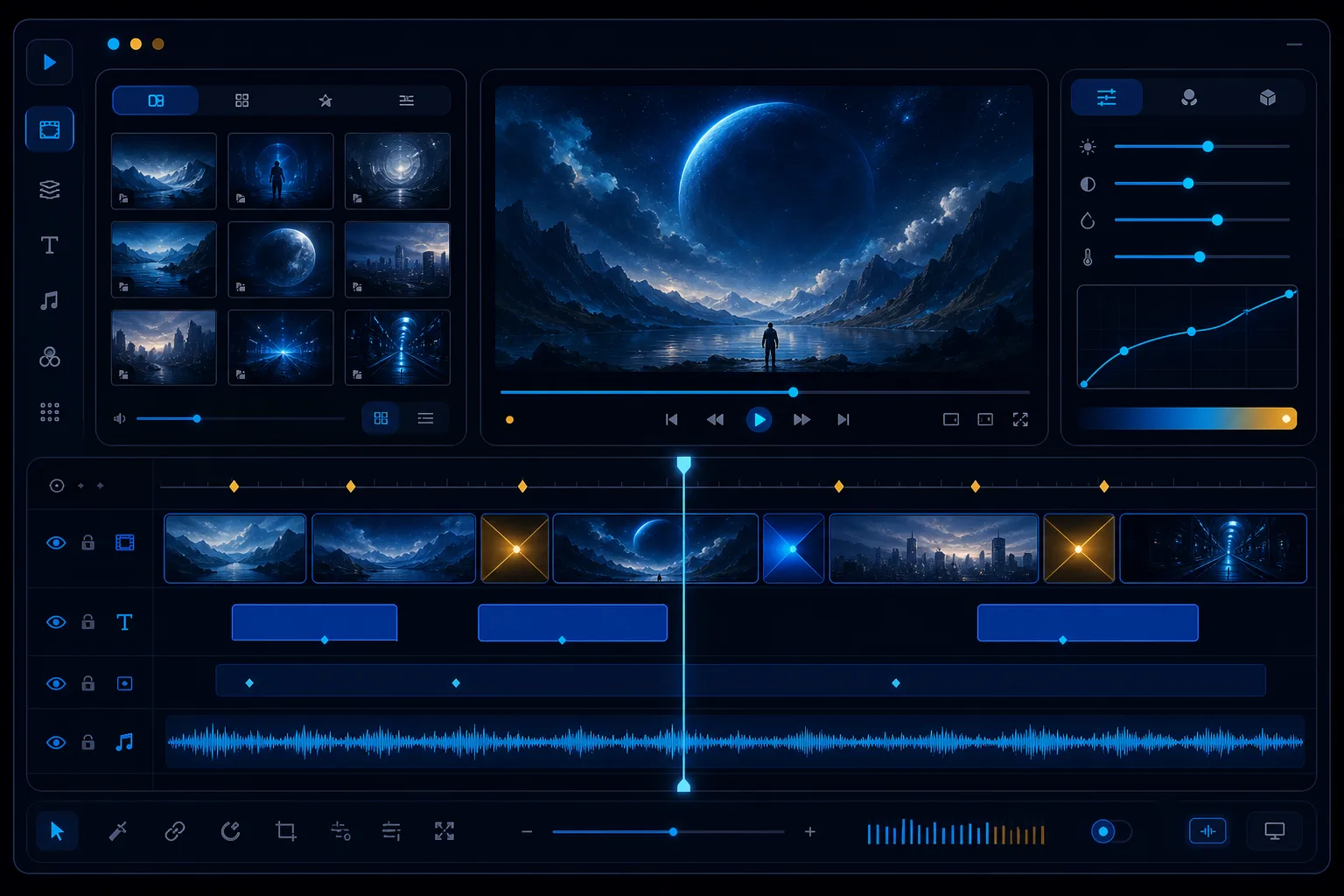
What sets Adzyn apart is the Media Studio editor that comes with every video. Reframe and resize for any platform aspect ratio, layer multi-font text and captions, add transitions, fade in and out, apply effects, drop in your logo, and merge, trim, or split clips on a clean timeline. It's a full editing suite, and using it costs nothing.

AI generation draws on your monthly credits, while editing in the studio is always free. That means you can refine, re-cut, and rebrand a clip as many times as you like without burning a single credit, then publish straight to the platforms that matter.
Why Adzyn

Why creators choose Adzyn video

Idea to video in minutes

Turn a product or a simple prompt into a finished short video, so you skip the camera, the crew, and the long edit and ship faster.

Free Media Studio editor

Edit, re-cut, and refine every video without spending credits. The studio is fully free, so iteration never costs you anything.

Any aspect ratio

Reframe and resize one clip for 9:16, 1:1, and 16:9 so a single video fits Reels, feeds, and YouTube without re-shooting.

Captions and text

Layer multi-font text and captions to keep viewers engaged with the sound off, the way most social video is actually watched.

On-brand every time

Add your logo, effects, and transitions so each video carries your identity and looks consistent across every channel you post on.

Bilingual and RTL ready

Work in fluent Modern Standard Arabic or English with full right-to-left support, so Arabic captions and text render perfectly.

How it works

How it works

1

Describe your video

Enter a prompt or pick a product, and Adzyn's AI generates a short, scroll-stopping video tailored to social feeds.

2

Open Media Studio

Drop your clip onto the timeline, then trim, split, or merge segments and arrange them exactly how you want, free of charge.

3

Style and brand it

Add captions, multi-font text, transitions, fades, effects, and your logo, then reframe for the right aspect ratio.

4

Publish everywhere

Export and post your finished video to Instagram, TikTok, YouTube, and more directly from Adzyn in one flow.

Generation powered by AI, editing that's free

Adzyn splits video into two clear stages so you always know what you're paying for. AI video generation, the part that turns a prompt or product into a finished clip, draws on your plan's monthly credits. Everything that happens afterward in the Media Studio editor is completely free. You can return to a clip again and again, trying new captions, swapping the logo, tightening the cut, or re-exporting in a different aspect ratio, without spending a single credit on any of it. This matters because great video is rarely right on the first pass. It takes iteration, and iteration that costs credits quietly discourages experimentation. By keeping the studio free, Adzyn lets you refine fearlessly, so the final video that reaches your audience is genuinely polished rather than simply good enough to save credits.

A full timeline editor inside your marketing platform

Media Studio is a real editing suite, not a token feature. On the timeline you can merge several clips into one story, trim away the dead weight, and split a long take into the exact moments you need. Layer multi-font text for titles and lower thirds, build captions that hold attention with the sound off, and time transitions and fade in and out so cuts feel intentional. Apply effects to set a mood, then place your logo so the brand stays present from first frame to last. Because the editor lives inside Adzyn, there's no exporting to a separate app, no version juggling, and no broken handoff between creation and publishing. You generate, edit, and post in one continuous workspace, which keeps your whole video workflow fast, organised, and on brand.

One video, every platform's perfect size

Each social network wants its own shape. Vertical 9:16 owns Reels, TikTok, and Stories; square 1:1 performs in feeds; and 16:9 is the standard for YouTube and longer placements. Re-shooting for each is a waste of time, so Adzyn lets you reframe and resize a single clip to any of these ratios inside Media Studio. You compose once, then adapt the framing so your subject stays centred and nothing important gets cropped out. Combined with captions and your logo, this means one production can fan out across every channel looking native to each. The result is wider reach without extra filming, faster turnaround on campaigns, and a consistent look no matter where someone meets your brand. It's the practical advantage that turns a single good idea into a full multi-platform video set.
Works with

Built for the platforms that love video

Instagram TikTok YouTube Facebook Snapchat Pinterest
FAQ

Frequently asked questions

Does editing in Media Studio use credits?
No. Editing in Media Studio is completely free and never uses credits. Only AI video generation draws on your monthly credits, so you can trim, caption, rebrand, and re-export as much as you want at no cost.
What aspect ratios can I export?
You can reframe and resize any video for 9:16 vertical, 1:1 square, and 16:9 widescreen. This lets a single clip fit Reels, Stories, feed posts, and YouTube without re-shooting or starting over.
Can I add captions and text to my video?
Yes. Media Studio supports multi-font text and captions, so you can add titles, on-screen messaging, and subtitles. This keeps viewers engaged even when they watch with the sound off, which is common on social.
Can I combine and trim multiple clips?
Absolutely. The timeline lets you merge several clips into one video, trim unwanted parts, and split a clip into separate segments. You arrange everything visually until the pacing and story feel right.
Is the video maker available in Arabic?
Yes. Adzyn is fully bilingual in Modern Standard Arabic and English with complete right-to-left support, so Arabic captions, text, and the interface all display correctly and read naturally.

Explore more

Start creating videos free

Create your first AI campaign in minutes — free.

Start free today